
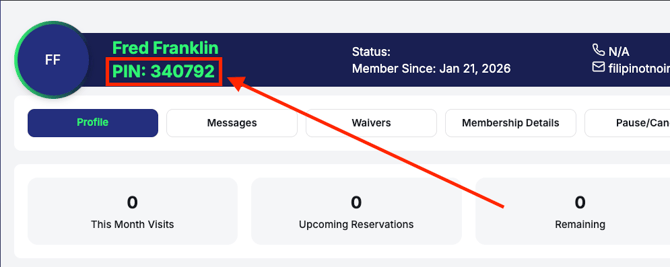
Every Fitness GM profile has a unique, auto-generated pin code used when checking into the gym for attendance. Staff members have specific security measures in place to ensure your and your members' data remain secure.
How to Find Your Pin
- Log into Fitness GM
- Go to Account in the left-hand menu
- The pin is in the banner across the top of the profile, next to or underneath your name
Pin Code Lock Screen
When Fitness GM is idle on a browser for 30 minutes, the screen will lock until the staff member's pin code is entered. Whichever staff member logged in to Fitness GM last on the idle screen is the staff member who will need to enter their pin.
Keep your pin code on hand in case the lock screen appears.
Session Timeout
As further security, Fitness GM will close and require you to log back in every 12 hours.